
Current language model (LLM) foundationLive
Flexible model choice, from small, efficient models to advanced reasoning models.
An AI virtual assistant trained on your company's own documents, customized to your brand and added to your website with a single line of code. It runs on current large language models (LLMs) and bases its answers on your documents (RAG).

A separate assistant for each organization: train the knowledge base from one panel via SharePoint, website crawling, an API data source or direct file upload, track training status and manage answer sources.
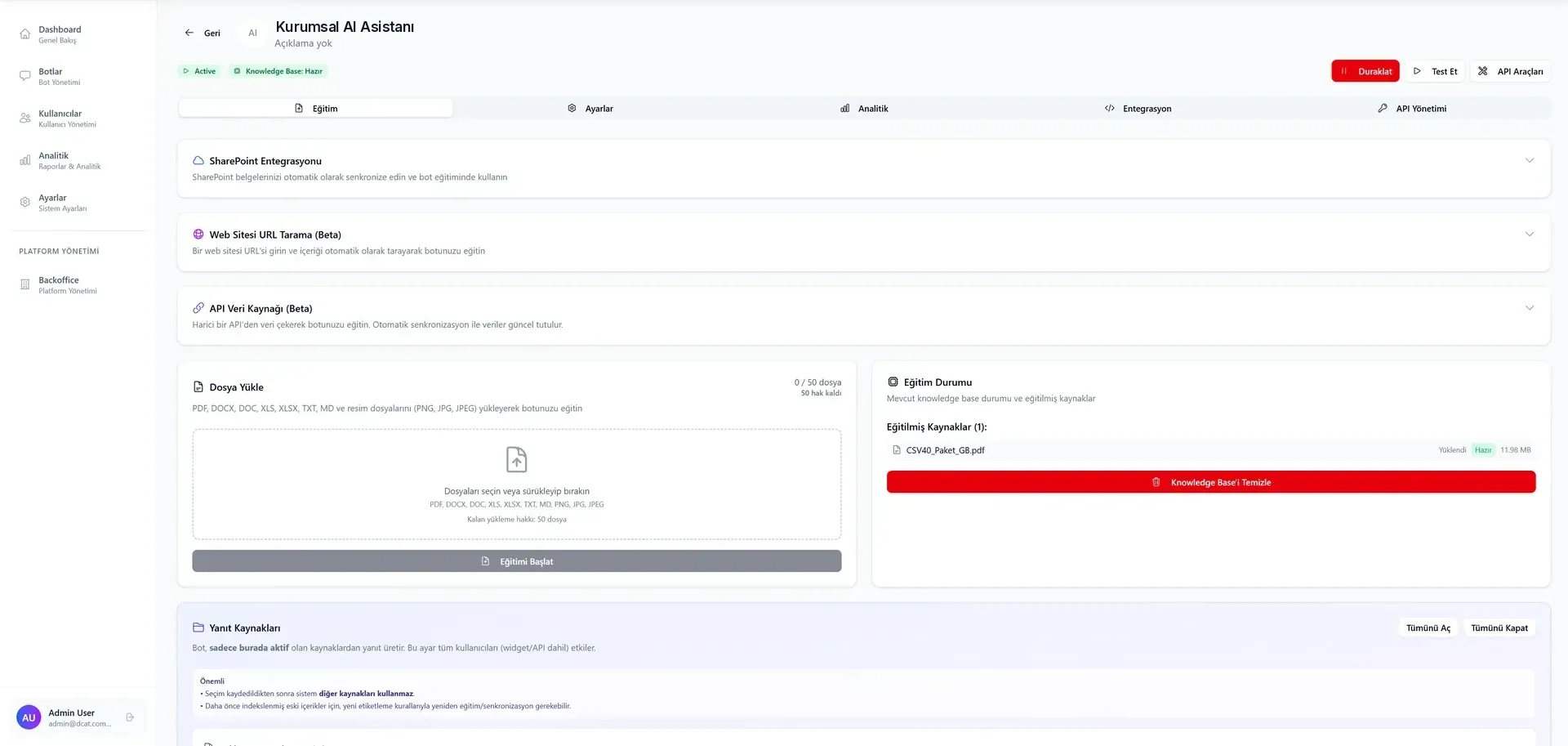
The assistant goes live with your own documents in three steps.
Upload your PDF, Word, Excel, TXT, PNG or JPEG files, or connect your SharePoint. The knowledge base is built from these sources and kept up to date through SharePoint.
Set colors, icon and tone of voice to match your brand. A single line of JavaScript adds the assistant to your website.
The assistant answers questions 24/7, taking repetitive questions off your customer service agents.
The capabilities in use in the admin panel today, and their status.
Flexible model choice, from small, efficient models to advanced reasoning models.
Answers are generated from the organization's own knowledge base.
SharePoint documents are synced automatically, so content stays up to date.
Feed the knowledge base by crawling a website or pulling data from an external API.
Integration with CRM, ERP and organization-specific systems.
Satisfaction score, response time and usage trends.
Turkish, English and other languages.
Typical internal and customer-facing uses of Orix.
Answers employees' routine questions on leave requests, payroll and procedures from the organization's own HR documents, reducing the HR team's load of repeat questions.
Answers questions about orders, returns, delivery and promotions, and guides customers step by step through self-service. Shipment tracking is provided through systems connected via API. Fewer repeat questions reach the call center.
Finds and summarizes financial information in PDF, Excel and Word files, and presents each answer together with the document it is based on.
AgenticObjects product · Implemented by D-CAT
Answers franchisees' operational questions from manuals and procedures, and guides them through the steps of opening and audit processes.
Orix uses your organization's knowledge through its own documents, within the limits you set.
The assistant only answers from sources marked as active in the admin panel; trained sources and training status are tracked in the panel.
You decide which documents go into the knowledge base; sources are added or removed in the panel.
The language model used and where the data is stored depend on the deployment model, and are agreed with the technical team in the demo meeting.
Short answers to the questions we hear most often on this topic.
From the PDF, Word, Excel, TXT, PNG and JPEG files you upload and the SharePoint you connect. Website crawling and API data sources are in pilot.
Yes. The assistant only answers from sources marked as active in the admin panel; trained sources and training status are tracked in the panel.
In three steps: you upload your documents or connect SharePoint, customize the assistant to your brand, and launch it by adding a single line of JavaScript to your website.
The language model used and where the data is stored depend on the deployment model, and are agreed with the technical team in the demo meeting.

A chat assistant built for your brand that works with your own documents.